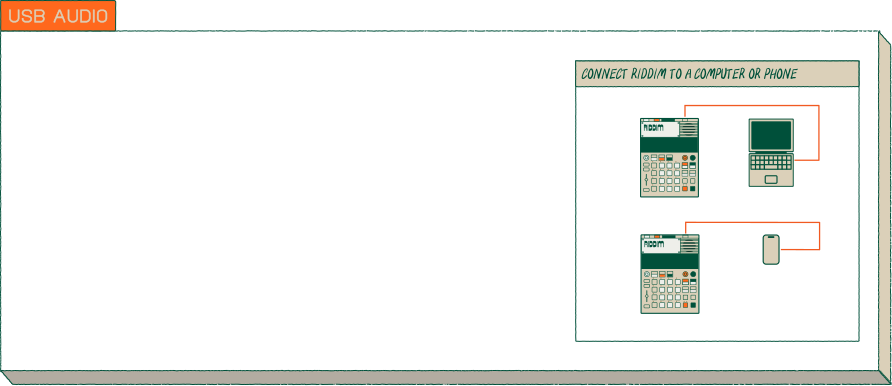
no headphone jack? no problem! now you can use USB audio with any class compliant USB audio host to connect your riddim straight in and send audio in and out of your phone or computer.
riddim supports stereo audio in, as both a sample source and an audio source. as well as usb audio out, to record sound directly into your DAW, or any other class compliant device.
just plug riddim into your phone or computer and select it as an input or output, or both!
riddim supports stereo audio in, as both a sample source and an audio source. as well as usb audio out, to record sound directly into your DAW, or any other class compliant device.
just plug riddim into your phone or computer and select it as an input or output, or both!
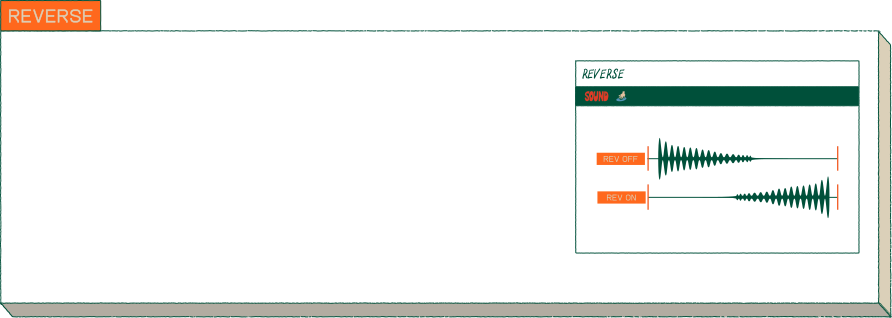
selpmas esrever nac uoy won!
reversing samples is a great way to bring life back to your existing sample library and discover new textures.
to reverse a sample, add it to a pad then press (shiftR) + (soundR) to open (soundR)(edit), press (plus) until you reach “tim”. rotate the (knobx) knob until “rev” shows on the display. play the sample again and it will be reversed. now you can go back to (mainR) and make a beat with it.
reversing samples is a great way to bring life back to your existing sample library and discover new textures.
to reverse a sample, add it to a pad then press (shiftR) + (soundR) to open (soundR)(edit), press (plus) until you reach “tim”. rotate the (knobx) knob until “rev” shows on the display. play the sample again and it will be reversed. now you can go back to (mainR) and make a beat with it.
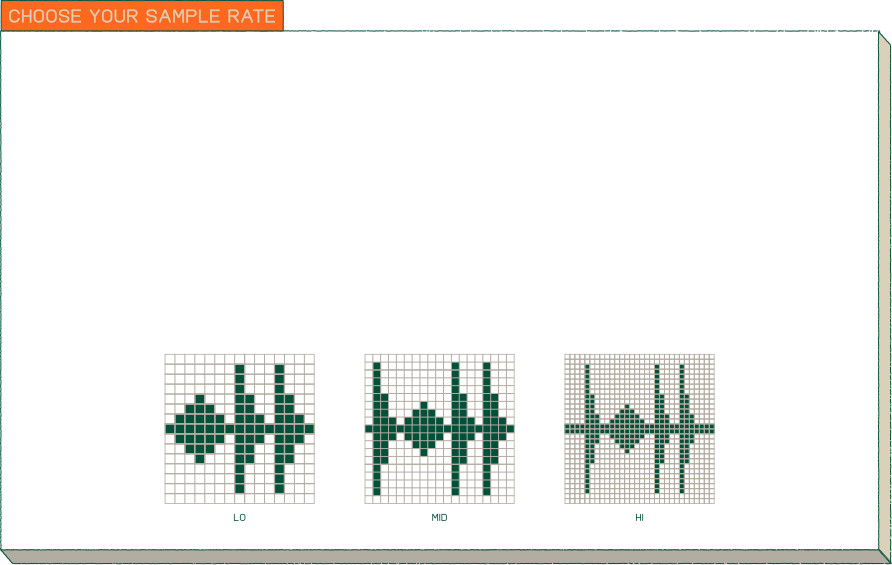
add character and use less storage by lowering the recording sample rate.
you can change the sample rate in system settings. press (shiftR) and (eraseR) to open (system) settings. press (plus) until you reach “smp” press (enter) and then “rec” will show on the screen. press (enter) again, then use (minus) and (plus) to select between lo, mid and hi sample rates.
lo is 26,250khz - which is very lo-fi.
mid is 32,000khz - which adds some charater.
hi is the standard 46,875khz - which is the standard quality on riddim.
if you want any other sample rates you can import samples at any sample rate directly onto riddim using the ep-sample-tool.
you can change the sample rate in system settings. press (shiftR) and (eraseR) to open (system) settings. press (plus) until you reach “smp” press (enter) and then “rec” will show on the screen. press (enter) again, then use (minus) and (plus) to select between lo, mid and hi sample rates.
lo is 26,250khz - which is very lo-fi.
mid is 32,000khz - which adds some charater.
hi is the standard 46,875khz - which is the standard quality on riddim.
if you want any other sample rates you can import samples at any sample rate directly onto riddim using the ep-sample-tool.
20 seconds not enough? now you can record mono samples up to 40 seconds long.
just switch the sample type to mono and the sample time will adjust up to 40 seconds, perfect for extra long samples.
to record a mono sample: press (sample), then press choose a mono source with (minus) and (plus) and hold a pad to record the sample to that pad.
just switch the sample type to mono and the sample time will adjust up to 40 seconds, perfect for extra long samples.
to record a mono sample: press (sample), then press choose a mono source with (minus) and (plus) and hold a pad to record the sample to that pad.
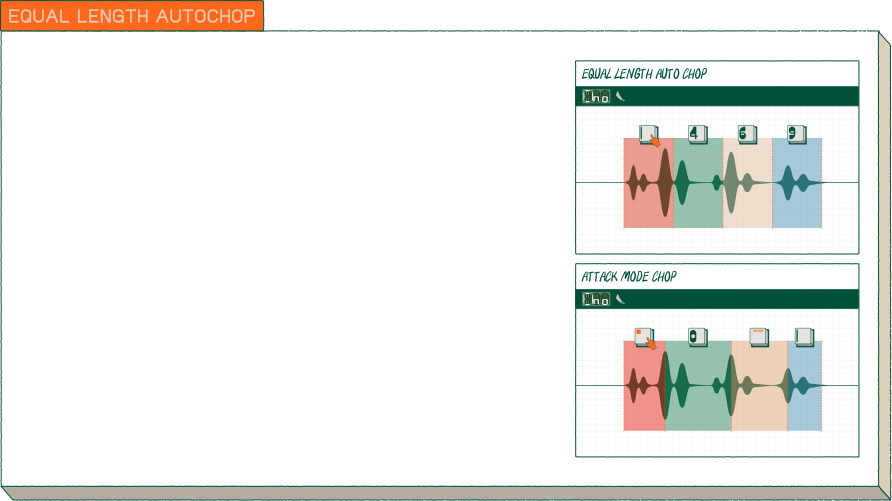
precisely slice your samples with equal length auto chop. now all your samples will slice exactly into even divisions, ideal for chopping a vocal or break beat.
select a sample on the (pads). press (shiftR) and (sample) to (chop). hold a group pad to select the auto chop mode and press (minus) and (plus) to select “EQU”. now you can let go of the group pad and select how many slices you want with (minus) and (plus). go back to (mainR) and your sample has been chopped.
select a sample on the (pads). press (shiftR) and (sample) to (chop). hold a group pad to select the auto chop mode and press (minus) and (plus) to select “EQU”. now you can let go of the group pad and select how many slices you want with (minus) and (plus). go back to (mainR) and your sample has been chopped.
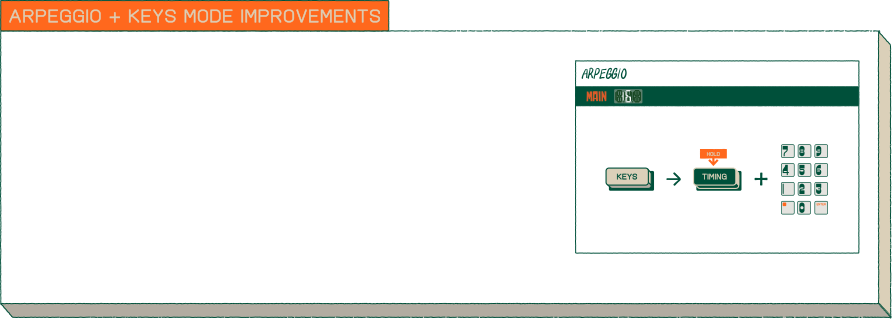
after many, many requests an arpeggio finally makes it’s way onto riddim!
to activate it, just enter (keysR) mode, hold (timing) and press multiple (pads). as long as the sound mode of the sample is either a oneshot or legato type sound it will be arpeggiated.
you can change the sound mode of any sample by pressing the pad it’s on and entering sound edit mode with (shiftR) and (soundR).
to activate it, just enter (keysR) mode, hold (timing) and press multiple (pads). as long as the sound mode of the sample is either a oneshot or legato type sound it will be arpeggiated.
you can change the sound mode of any sample by pressing the pad it’s on and entering sound edit mode with (shiftR) and (soundR).
release notes
- added: Improved timestretching: Heavily stretched samples sound cleaner, preventing beats from doubling or skipping. Ported from EP-1320.
- added: Crop sample to trim points: Hold SHIFT+SOUND in the Trim page to permanently trim the file on disk.
- added: Playback position display: SOUND EDIT TRI shows position in seconds while a pad is held.
- fix: Improved handling of disk full when saving samples.
- fix: SHIFT+CHOP chopped the wrong pad after switching groups.
- fix: pad LEDs could get stuck after returning to main view from chop.
- fix: Uploading samples while in SAMPLE could corrupt samples.
- fix: Pressing FADER unexpectedly exited FX send mode.
- fix: Crash when transferring samples via EP Sample Tool with unstable USB connections.
- fix: Resampling a pattern could stop at wrong time when beat repeat was active.
- fix: Sample trim points preserved when exporting/re-importing via EP Sample Tool.
- fix: Long sample names scroll in a continuous loop when holding pad in SOUND.
Sequencer and Performance
- added: Per-pad pattern copy/paste. Hold a pad + SHIFT+C to copy that pad's notes. SHIFT+D to paste.
- added: Erase per-track fader automation. ERASE+FADER+pad erases automation for a specific track.
- added: Timing correct, per-pad time shift: Hold a pad and press +/- to shift all notes in that track by one tick.
- added: Hold FX during latched resampling (SHIFT+pad) to tweak FX X/Y live.
- fix: PO sync (SYNC 8) auto-start fixed after stopping sequencer on internal clock.
- fix: FX+GROUP solo now also selects that group as the active edit group.
- fix: SHIFT+FADER (fader reset/recall) disabled during playback to avoid conflicting with fader automation.
- fix: Legato mode, notes no longer stick when playing keys over a running pattern.
- fix: Beat repeat (FX+1) could silence a note still playing when engaged from bar 2 onward.
- fix: Beat repeat could cut off the wrong note when used with mute groups.
- fix: PO sync auto-start now restarts from the beginning.
- fix: Rare crash while switching patterns.
- fix: Undo icon now lights up when erasing notes with ERASE+GROUP while playing.
- fix: Pasting a single track (TRK) no longer shortens the destination pattern.
- fix: Note repeat with swing. notes could be cut short or skipped in LEG and KEY play modes.
- fix: Audio glitch when switching scenes while sequencer is playing.
- fix: Crash when switching projects ("ERR SCENE 109").
- fix: Sequencer "reset all controllers" now also resets local pitch bend and mod wheel state.
- fix: Sounds no longer cut off instantly when song reaches the end.
keys mode
- changed: New scale/key selection. Hold KEYS + turn X knob for key, Y knob for scale.
- added: Three new scales: Blues (BLU), Harmonic Minor (H.MI), Melodic Minor (M.MI).
- changed: Scale and key are now saved per project.
MIDI and sync
- added: CC 64 sustain pedal support for Key and Legato voices.
- added: CC 12/13 control for FX X/Y parameters.
- added: MIDI identity request/reply now works over TRS MIDI.
- fix: Improved SYNC 16/24 IN handling of noisy start/stop signals.
- fix: Avoided stuck notes when changing MIDI channel in SOUND EDIT.
improvements
- Mono panning: Constant power panning — mono sounds no longer get quieter when panned.
- BLE MIDI clock: Reduced jitter by measuring BPM per beat rather than per tick. Improves timestretch and sidechain sync over BLE.
- BAR time stretch now syncs correctly in non-4/4 time signatures.
- fix: Song mode SPP. MIDI Song Position Pointer is now relative to song start, not scene start. DAW playhead navigation works correctly.
- fix: improved file transfer reliability and reduced audio pops during transfer.
- fix: Improved SHIFT+X/Y finetune of trim points: Holding shift zooms to a 1 second window.
fix: Firmware update rewritten for improved robustness against transfer errors.- fix: Battery power dips now cause a clean reboot with BAT message instead of audio glitches.
update your device here

