the system menu is where you can customise the function of your K.O.–sidekick.
you can find the system button under the battery lid.
open system menu
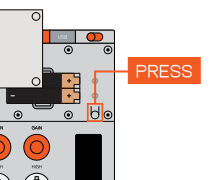
press the system button under the battery lid to open the system menu.
scroll the list
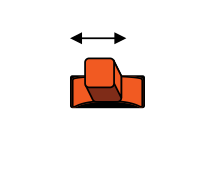
to move the cursor and scroll through the list of settings use the mod stick.
select item
to select an item from the list, press (select).
adjust setting
when in a system setting, use the mod stick to adjust the parameters for that setting.
confirm setting
press (select) to confirm the adjusted parameter and move to the next parameter. when reaching the end press select to return to the main system menu.
return to main
press the system button to return to the main screen.
Outgoing control messages
control
cc 1
cc 2
ch
gain knob
20
25
1-2
gain button
21
26
1-2
cue button
3
52
1-2
fx button
14
15
1-2
eq high knob
22
27
1-2
eq mid knob
23
28
1-2
eq low knob
24
29
1-2
fader
7
9
1-2
force pad
1
2
3
mod stick is mapped to midi pitch bend (Ch3)
CC2 is a secondary control when
holding select button
CC2 is a secondary control when
holding select button
Incoming control messages
control
cc
ch
master cue mode
27
3
master fx mode
28
3
cue enable
3
1-2
fader
7
1-2
eq high
22
1-2
eq mid
23
1-2
eq low
24
1-2
gain
20
1-2
pan
10
1-2
compression
12
1-2
saturation
13
1-2
fx amount
1
1-2
fx type is set with program change 1-6 (Ch1-2)
fx param is mapped to midi pitch bend (Ch1-2)
local control off (CC#122) = disable knobs/buttons
fx param is mapped to midi pitch bend (Ch1-2)
local control off (CC#122) = disable knobs/buttons


