15. lights
15.1 lights introduction
the OP-Z has a separate track dedicated entirely to controlling your light rig.you can program this track just like any other track on the OP-Z.
15.2 lights operation
set pattern
use the value keys to select one of the 10 patterns.
use the value keys to select one of the 10 patterns.
effects
play the white keys to trigger effects and animations.
play the white keys to trigger effects and animations.
preview mode
toggle between fixture preview and step view
toggle between fixture preview and step view
15.3 light parameters
main color
the main color applied to all connected rgb fixtures
the main color applied to all connected rgb fixtures
alternate color
used by certain effects to instantly switch color
used by certain effects to instantly switch color
pattern speed
the scroll speed of the currently selected pattern
the scroll speed of the currently selected pattern
intensity
the default intensity of the currently lit fixtures
the default intensity of the currently lit fixtures
15.4 setup
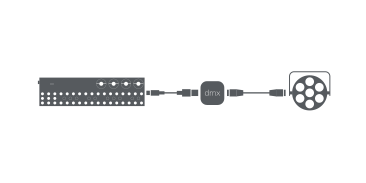
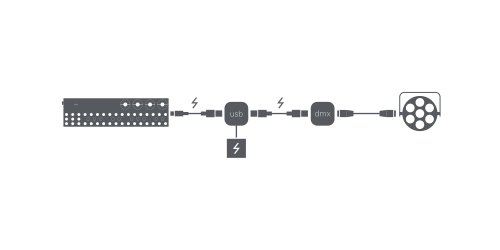
to control dmx you need a usb dmx interface connected to the OP-Z. It can be connected directly to the usb port.
connecting the dmx interface directly to you OP-Z is convenient but might deplete you battery faster than you want. in that case, use a powered hub.
connecting the dmx interface directly to you OP-Z is convenient but might deplete you battery faster than you want. in that case, use a powered hub.
15.5 configure dmx

dmx.json
OP-Z can transform sequencer data to dmx channel data and send it out using a usb dmx interface. use the dmx.json file found in content mode to configure the outgoing channel data to correspond to your dmx fixture setup.
the maximum total number of channels that can be configured is 128.
the supported channel types are:
the supported channel types are:
channel range description
red
0 – 255
red color
green
0 – 255
green color
blue
0 – 255
blue color
white
0 – 255
white color
color
0 – 255
color wheel
intensity
0 – 255
intensity / dimmer
fog
0, 255
triggered by animation 14
knob1
0 – 255
green dial (page 1)
knob2
0 – 255
blue dial (page 1)
knob3
0 – 255
yellow dial (page 1)
knob4
0 – 255
red dial (page 1)
knob5
0 – 255
green dial (page 2)
knob6
0 – 255
blue dial (page 2)
knob7
0 – 255
yellow dial (page 2)
knob8
0 – 255
red dial (page 2)
0 – 255
0 – 255
custom fixed value
on
255
always on
off
0
always off