OP-1
accessories
accessories
user guide
ガイド
v.1.0
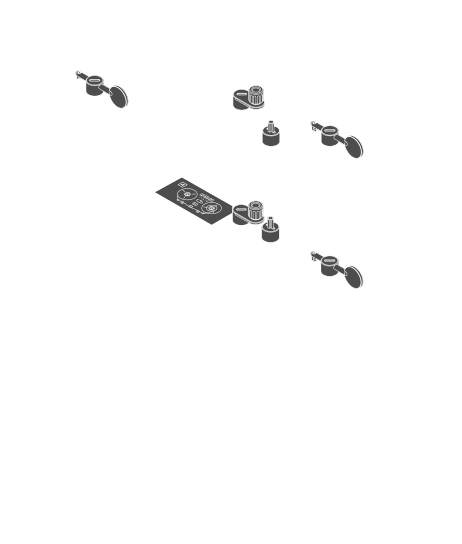
BENDER ASSEMBLY
ATTACHE RUBBERBAND
AROUND THE BLUE,
GREEN OR WHITE ENCODER
DEPENDING ON
PREFERRED TENSION.
AROUND THE BLUE,
GREEN OR WHITE ENCODER
DEPENDING ON
PREFERRED TENSION.
FIX RUBBER BAND
AROUND BENDER
HOOK.
AROUND BENDER
HOOK.
FIX RUBBER BAND
AROUND BENDER
HOOK.
AROUND BENDER
HOOK.
the OP-1 strap turns your
OP-1 into a guitar type
performance instrument.
OP-1 into a guitar type
performance instrument.
USB cable
spare part.
use for charging
and file transfer.
spare part.
use for charging
and file transfer.
OP-1 knobs
spare part.
may be used on 3rd party
products that use D-shaft
encoders or potentiometers.
spare part.
may be used on 3rd party
products that use D-shaft
encoders or potentiometers.
- crank
hand cranked recordingin tape mode press SHIFT+REC. turn the crank to move the tape forward.
TOMBOLA
in sequencer mode select the tombola sequencer. hold SHIFT+turn the crank to rotate the tombola.
ENDLESS MUSIC BOX
in sequencer mode select the endless sequencer. hold SHIFT+turn the blue knob to switch to music box mode. insert notes by pressing SHIFT+notes. turn the crank to play your melody.
LFO
in LFO mode select the crank LFO and set the parameters and your preferred destination.
- bender
pitch bend / LFO bendin LFO mode select the bender LFO and set the parameters and your preferred destination. user rubber band for elasticity.
- brick shaft
LEGO compatible LFO control. this accessory enables liberation with for example LEGO mindstorm using computer controlled motors to control your OP-1's LFO.
- screen protection
protects your OP-1's screen. see instructions on the film,
- FM antenna
increases the FM signal reception. insert in your
OP-1's audio in port.
- strap kit / strap loop / M6 covers
for guitar type performance. use the M6 covers to protect the M6 holes when no strap loop is used. WARNING: don't screw loops too tight.